

What Is EPG in IPTV? A Simple Guide to the TV Guide Behind Your Channels

EPG stands for Electronic Program Guide. In IPTV, it is the on-screen schedule that shows what is currently playing on each channel and what is coming up next, the same idea as the TV guide you would see on a normal cable or satellite box. Without EPG, an IPTV app just shows a plain list of channel names with no information about what is actually airing.
If you have ever opened an IPTV app and seen a small grid with show titles and times under each channel, that is the EPG. This guide explains what it means in plain language, how it works, how to turn it on, and what to do when it stops showing the right schedule.
EPG Meaning in IPTV, Explained Simply
Picture pressing the guide button on a normal cable or satellite remote. A grid pops up showing every channel down the side, and next to each one, what is playing right now and what is coming up next. That grid is called an EPG.
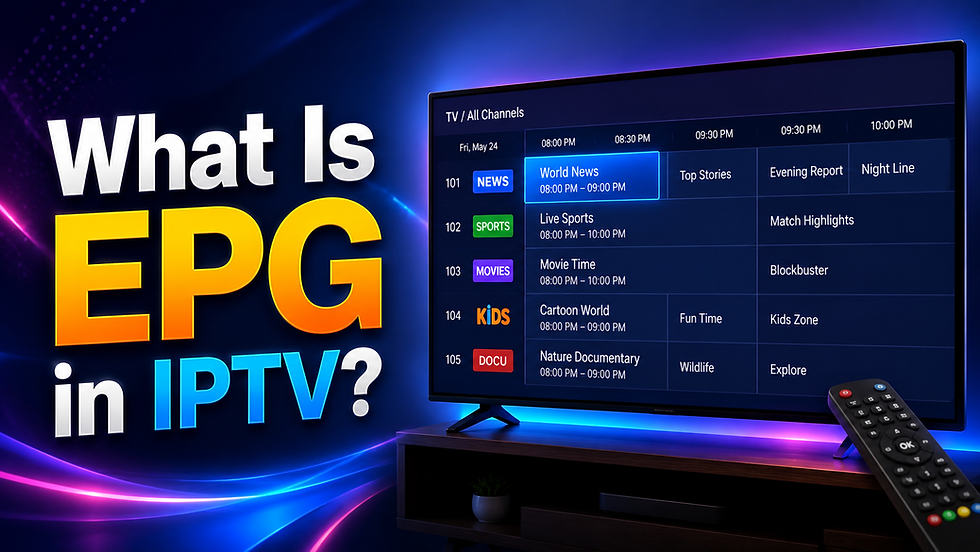
IPTV works the same way. The only difference is where that schedule comes from. On cable, it arrives through the same signal as the channels themselves. On IPTV, it comes as a separate piece of information sent over the internet, which your app then displays as that same kind of grid.
Without it, your IPTV app becomes just a bare list of channel names, nothing else. You would have to switch to a channel and hope something good happens to be on. With EPG turned on, you can see what is playing right now on every channel, what is coming up in the next hour, and often what already finished airing earlier in the day.
How Does EPG Work in IPTV?
Here is what actually happens, explained one simple step at a time, without the technical detail getting in the way:
1. Someone puts together the schedule. Your IPTV provider, or sometimes a separate company that specialises in this, builds a list of what is airing on each channel, including the show name, what time it starts, what time it ends, and usually a short description.
2. That schedule gets turned into a link. This list is saved as a file that lives on the internet, and your provider gives you a web link (often called an EPG link or EPG URL) that points to it. Think of this link the same way you would think of a web address; it simply tells your app where to go to fetch the schedule.
3. Your app fetches that link and reads it. Whatever app you use to watch IPTV takes that link, downloads the schedule from it, and works out which programs belong to which channel.
4. It keeps itself updated automatically. Your app checks that same link every so often, usually every few hours, so the schedule you see stays current without you having to do anything.
5. You browse it like a normal TV guide. Once it has loaded, you can scroll through the grid, tap on a show to read a short description, and quickly see what is worth watching right now.
If a couple of unfamiliar terms come up later in this guide, like a provider mentioning an M3U link or a playlist, just know these simply mean the file or link your provider gives you that contains your channels. The EPG link works the exact same way, just for the schedule instead of the channels themselves.
What EPG Actually Shows You
A well-set-up EPG typically displays:
The show playing right now on a channel, often with a small progress bar showing how far along it is
The next show coming up after the current one ends
A short description explaining what the show is about
The start and end time of each show
On some apps, a simple tag, like sports, news, or movies, to help you browse
For sports channels especially, this becomes genuinely useful. Instead of guessing whether a match has already started, the guide shows you the exact time it began and roughly when it should finish.
What IPTV Looks Like Without EPG
It helps to see the actual difference this makes, side by side:
With EPG | Without EPG | |
Channel list | Shows the show name, time, and a short description for each channel | Shows only the channel name and number, nothing else |
Finding something to watch | Browse by what is currently airing or coming up soon | Have to switch channels one by one to see what is on |
Sports and live events | Shows the exact start and end time | No way to tell if the game already started |
Overall feel | Feels like a real cable or satellite guide | Feels like a plain, bare list |
This is exactly why people say EPG is one of the things that makes IPTV feel like a proper cable replacement, rather than just a raw list of channels with nothing else attached.
Where Do I Get My EPG Link, and How Do I Turn It On?
This is usually the part beginners get stuck on, so here it is in full detail:
Step 1: Get the link from your provider. When you sign up for an IPTV service, your provider will normally send you three things: your username and password, your channel link, and your EPG link. If you only received two of these, message your provider and ask them directly for the EPG link, sometimes called an EPG URL. Most providers can send this within minutes.
Step 2: Open your app's settings. Every IPTV app is laid out a little differently, but you are looking for a section usually called Settings, Playlists, or sometimes just EPG. This is usually reachable from the main menu or a small gear icon.
Step 3: Paste the link into the right box. There will be a field to paste your EPG link. Some apps ask for this at the same time you add your channel link, while others treat it as a separate step further down in settings. If you are using a login and password instead of a link, in many cases the app will fetch the EPG automatically without you needing to add anything extra.
Step 4: Save and give it a moment. After saving, it can take a minute or two the first time for your app to fully download and display the schedule. This is normal, especially if your provider offers a large number of channels.
Step 5: Check a few channels. Open two or three channels you know well and confirm the schedule showing next to them actually matches what should be airing. If it looks correct, you are done.
Why Is EPG Not Working or Showing the Wrong Schedule?
This is one of the most common frustrations with IPTV, and it almost always comes down to one of a few simple causes:
No schedule shows up at all. This usually means the EPG link was never added, or was copied incorrectly with part of it missing. Go back into settings and check the full link was pasted in, with nothing cut off at the beginning or end.
The schedule looks stuck or outdated. Sometimes your app simply has not refreshed itself recently. Most apps have a manual refresh button somewhere in settings, or you can try removing the EPG link and adding it again.
Shows appear under the wrong channel. This happens when the names your provider uses for their channels do not quite match the names inside the schedule file. It is not something you did wrong; it is usually a mismatch on the provider's side, and reporting it to them is often the fastest fix.
Some channels have no schedule while others do. Smaller or more regional channels are sometimes simply missing from a given schedule source. This is common and does not mean anything is broken; it usually just means that particular channel is not covered.
Everything seems to be showing at the wrong time. If every single show looks like it is airing an hour or more off from when it should be, this is almost always a time zone setting inside your app rather than a problem with the schedule itself. Check your app's settings for a time zone option and make sure it matches where you actually live.
Frequently Asked Questions About EPG in IPTV
What does EPG stand for in IPTV?
EPG stands for Electronic Program Guide. It is the on-screen schedule that shows what is playing now and what is coming up next on each channel.
Do I need EPG for IPTV to work?
No. Your channels will still play perfectly fine without it. EPG does not affect whether your streams work; it only adds the schedule information on top. That said, most people choose to turn it on anyway because it makes finding something to watch much easier, so it is worth setting up even though it is optional.
What is an EPG link?
It is simply a web link your provider gives you that contains the show schedule for your channels. Your app uses this link the same way it uses your channel link, just to fetch schedule information instead of the channels themselves.
Why does my EPG show the wrong channel information?
This usually happens when the channel names your provider uses do not line up correctly with the names inside the schedule file. It is a mismatch, not something wrong with your setup, and your provider can usually fix it on their end.
Can I use a different EPG source than the one my provider gave me?
In many apps, yes. Some IPTV players let you add your own EPG link separately from your provider's one, though you may need to double-check the channel names line up correctly for it to display properly.
The Bottom Line
EPG is a small feature that makes a big difference in how easy an IPTV service is to actually use day to day. It is the difference between flipping through a bare list of channel names and knowing exactly what is on, what is coming up next, and when your favourite match kicks off. If your app supports it and your provider gives you a working link, setting it up takes only a few minutes and makes the whole experience feel a lot closer to a real cable guide.


Comments